Why people are leaving Dropbox: what real users actually report
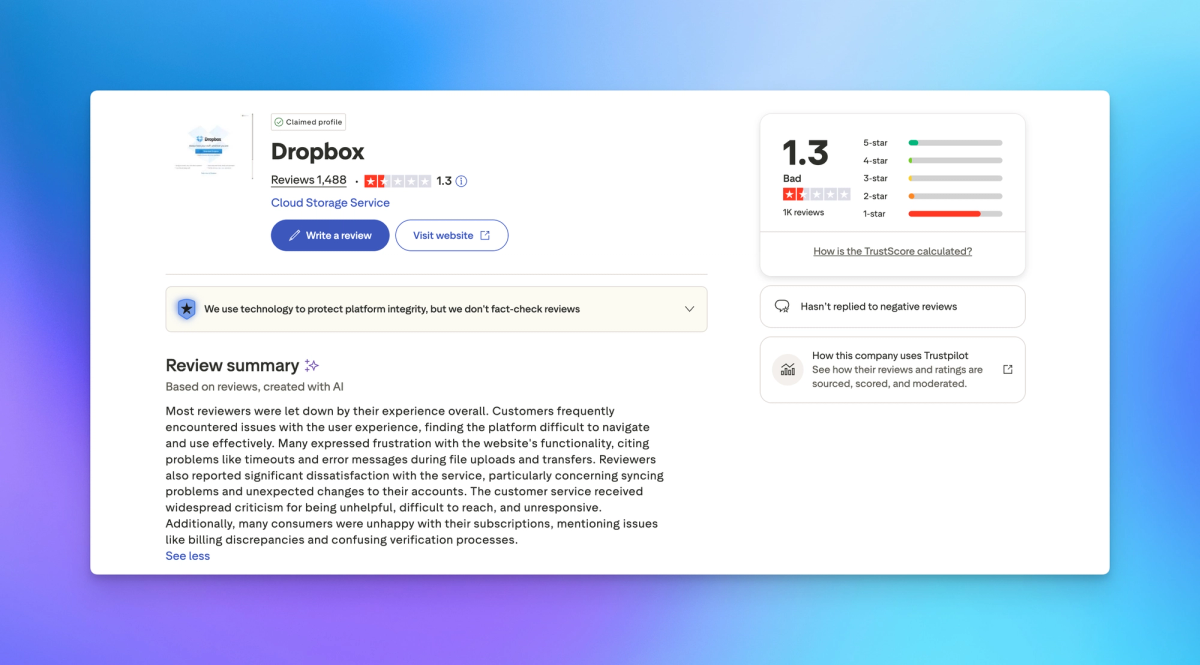
Dropbox has 1,487 reviews on Trustpilot. 77% are one star. Here is what real users say most often, and what actually works better for client-facing businesses.

Dropbox has 1,487 reviews on Trustpilot. 77% of them are one star. That is not a disgruntled minority. It is a consistent, cross-country pattern from users in the United States, United Kingdom, Australia, Canada, Belgium, South Africa, Denmark, and across Europe. The issues they describe are not random. The same categories appear again and again, independently, from users who have never met each other.
This article documents what those users report, using their own words and names as they appear in public reviews. Anyone evaluating file sharing tools for their business deserves to know this before committing to an annual contract.
Cancellation is designed to be difficult
The most reported complaint across the entire Trustpilot dataset is cancellation. Users describe multiple screens designed to discourage leaving, with misleading buttons, new offers presented mid-flow, and steps that appear to complete cancellation but do not.
Mark Lundquist from the UK put it simply: "Nearly impossible to cancel. Its like a disease you can't get rid of."
Andrew Gelao from Australia wrote that Dropbox charges recipients to download files someone else paid to send, and that it charged him even after he cancelled during a free trial. He described this happening to him twice. His company's policy is now no Dropbox at all.
Adam S from the Netherlands described having to navigate a jungle of buttons to cancel a free trial, completing what he believed was a successful cancellation, and then being charged. LT_lax from the UK described five separate screens each designed to cause a mis-click, followed by a charge for software he did not even have installed.
Sharon Huang from the US said she had to cancel her card entirely to stop the charges after the website made it impossible to end recurring billing. Pat Beard, also from the US, spent two weeks trying to cancel with no phone support and no live agent. Multiple people across different countries describe this independently, suggesting it is not a regional bug.
Charges continue after confirmed cancellation
Separate from difficult cancellation is the pattern of charges continuing after users have documentary proof they already cancelled. This appears in dozens of reviews with specific amounts cited.
Jen Nakonechny from Canada cancelled during a free trial and was charged anyway. She then discovered that disputing the charge required completing a physical form and mailing it to Dropbox. "If my account is cancelled, how do they still have my information?" she asked.
Sara Porter from the UK cancelled her subscription years ago, together with the auto-payment, and Dropbox has taken money from her account every year since. Her only option each time is spending hours on the phone with her bank. Cindy Simmons from the US sold her business in 2025 and has been trying to stop the payments ever since. She received a confirmation email saying her account was closed. The December 2025 payment came out anyway.
Phil Hurst from the UK downgraded to the free tier and contacted Dropbox multiple times over six months. A representative assured him the request had been passed to the accounts team. The monthly fee continued throughout.
James Thrussell from the US described the same pattern: he cancelled and they continued to charge his card. Multiple emails. No resolution.
Auto-renewal without warning
Dropbox renews annual plans automatically. Several users document being charged for a full year with no prior reminder and then finding there is no refund path.
Kane, a UK reviewer with ten years as a Dropbox Business customer, requested a routine license reduction before renewal, the same change Dropbox had processed without issue in 2022, 2023, and 2024. This year Dropbox refused, citing a 30-day notice period. In every previous year Kane had received a renewal reminder. This year he received none. Dropbox held him to the deadline regardless. He has begun migrating to Microsoft 365.
Bobby LAM from the UK had been on annual billing at $119.88 for years. Without any notice, his account was switched to monthly billing at $11.99 starting March 2025. He never authorized the change. Support provided no explanation and no refund.
Steven S from Belgium discovered that pending user invitations sent years earlier were being billed as full active licenses year after year, even though those users had never accepted, never logged in, and never stored a single file. The total came to over 1,700 euros. Dropbox's response pointed to the fine print.
Elspeth Whitney from the US described being auto-renewed for $119 and being told refunds were not available. "They got me for another $119 but have made me angry with them for life."
No phone support, bots that cannot help
Dropbox does not offer phone support for most plans. When users do find a number, reviewers report being directed to a website and disconnected. Roxanne Lloyd from Australia confirmed this: she found a Dublin number, called it, and was hung up on.
The in-product support routes through a chatbot that, according to dozens of reviewers, cannot connect users to a human and cannot resolve anything requiring account access or escalation.
Neil Barnett from the UK tried to access files a client had shared with him. The chat service connected him not to Dropbox but to a third-party service called Howly, which required a credit card and charged over $38 to speak with someone.
Robert Olson from the US described support as nothing other than a chatbot that will run you in circles. Angela from the UK wrote that there is no support unless you pay for it, and described the experience of having to find something else.
Kris Lockwood from the UK contacted Dropbox by email before signing up for a business account. Nobody replied to the email. Days later, a phone number flagged as suspicious began calling. When she finally answered, a Dropbox representative expressed visible frustration that she had found another provider, huffed down the phone, and said "alright, bye."
2FA locks users out with no recovery
Two-factor authentication on Dropbox ties account recovery to the original phone number or authentication device. Users who change phones, move countries, or lose access to their original email address describe being permanently locked out with no support resolution.
Charlene Herbst from Canada moved abroad, changed her phone number, and switched to Linux. Dropbox's 2FA required a code sent to a number she no longer had. Support continued taking her monthly payments but could not verify her identity through billing information for account recovery.
Roland from Australia was locked out after getting a new phone. Dropbox's proposed solution was to send highly personal documents by email. He refused and remained locked out.
Becks from the UK spent thirty minutes trying to log in, described being put through five separate verification games that looped back to the start, and summed it up directly: "DropBox you are holding my documents hostage."
Johan J from Sweden described a captcha requiring ten steps with seven images per step, a total of seventy images, just to attempt a login.
Files deleted or lost without explanation
Several reviewers document files being deleted with no explanation and no effective support response.
Kevin Pratt from the US is a current paid customer. Dropbox deleted years of his files and has refused to restore them and refused to discuss it. "If a data storage company cannot properly store data they are useless," he wrote, recommending that anyone with data stored there move it immediately.
Aly Schlobohm from the US described Dropbox deleting a large number of files for no apparent reason, and then finding that the platform would not allow her to download full folders to retrieve what remained.
Katy Smith from Pakistan had her account deleted after ignoring a warning email buried in promotional mail. Dropbox said recovery was impossible.
Backup that cannot restore your data
Dropbox sells a Backup product. Multiple reviewers who relied on it during real data loss events found that restoration at scale does not work.
Pete Baxter from Australia backed up a large Photos library of hundreds of gigabytes. When he needed it, there was no functional restore option. Web downloads failed due to undocumented limits. Downloading in smaller chunks still left large portions of original files missing. Support gave misleading advice, then dismissed the issue. His conclusion: a backup that cannot be restored is not a backup.
Klement from South Africa paid for 2TB. After a drive failure, there was no desktop restore, no bulk restore, and no disaster recovery option that worked at scale. The web interface required downloading a few folders at a time across thousands of folders. "Dropbox Backup is not a backup, it is a data hostage situation," he wrote. His company of 40 team members moved to Google Drive.
Jesper Nielsen from Denmark had a Dropbox Paper document become unreadable overnight. Two months of support contact produced stalling responses, repeated requests for the same information, and no resolution. Because Paper is a proprietary format, there was no way to recover the file through standard means.
Shared folder storage counted against the recipient
When someone shares a Dropbox folder with you, that folder counts against your storage quota. This is not how most competing platforms work and it creates a specific problem for anyone working with external clients or collaborators.
Richard from the UK described paying for 2TB and discovering that sharing a large folder with someone required that person to also pay Dropbox for the same storage he was already covering. Dropbox refused any refund. Austin D from the US noted that Google Drive and OneDrive both handle shared folder storage differently, and described the Dropbox model as creating a problem and then selling the solution.
Tom from the UK described the situation directly: "They double charge for storage. If I have a file and I want to share it with you, I have to pay, and you have to pay."
A billing interruption can permanently change your plan
One of the more serious patterns in the reviews involves what happens when a payment issue triggers a plan downgrade. A UK reviewer who stored tens of terabytes of professional client data had a temporary card problem caused by their bank flagging Dropbox as potential fraud. They updated the payment immediately. Dropbox permanently removed the storage allocation they had retained from a discontinued unlimited plan, forced them onto a new plan with a 30TB cap, and told them restoring the previous storage would cost thousands more per year.
Support stated there was no escalation path. The reviewer summarized: one card issue and years of agreed terms vanish overnight. They described it as a platform risk any business storing large volumes of data should understand before relying on Dropbox long-term.
Features removed without replacement
Dropbox Vault, Dropbox Passwords, and Unlimited storage plans have all been discontinued. Users who built workflows around these features received no adequate alternative.
Michael Curro from the US described Vault as his primary reason for choosing Dropbox over other providers. After removal, the service no longer met his needs but his subscription continued.
Reece Warner from the UK wrote: "Removing their vault feature, gave no alternative. Absolutely idiots run this company." Jeremy Stec from the US described switching to Microsoft 365 and getting OneDrive plus 1Password through a bundle, at a comparable price, and called the decision obvious after Dropbox removed Passwords.
John D from the US described 20 years on the platform and a product that started as a single feature done simply, turning over the past decade into slow, bloated software full of intrusive upgrade messages. He moved to pCloud and is migrating his data.
What this means for anyone evaluating file sharing tools
None of the above makes Dropbox unusable for everyone. The 10% five-star reviews represent real people with a different experience, and for internal file storage and sync within a team that all uses the platform, it works for many users.
The problems concentrate in specific situations. Needing to cancel. Experiencing a billing issue. Relying on the backup product for actual data recovery. Sharing files with external clients. Needing support for something a front-line agent cannot resolve. If any of those describe your business, the pattern across hundreds of independent accounts is worth knowing before signing an annual contract.
What Sharebrand does differently
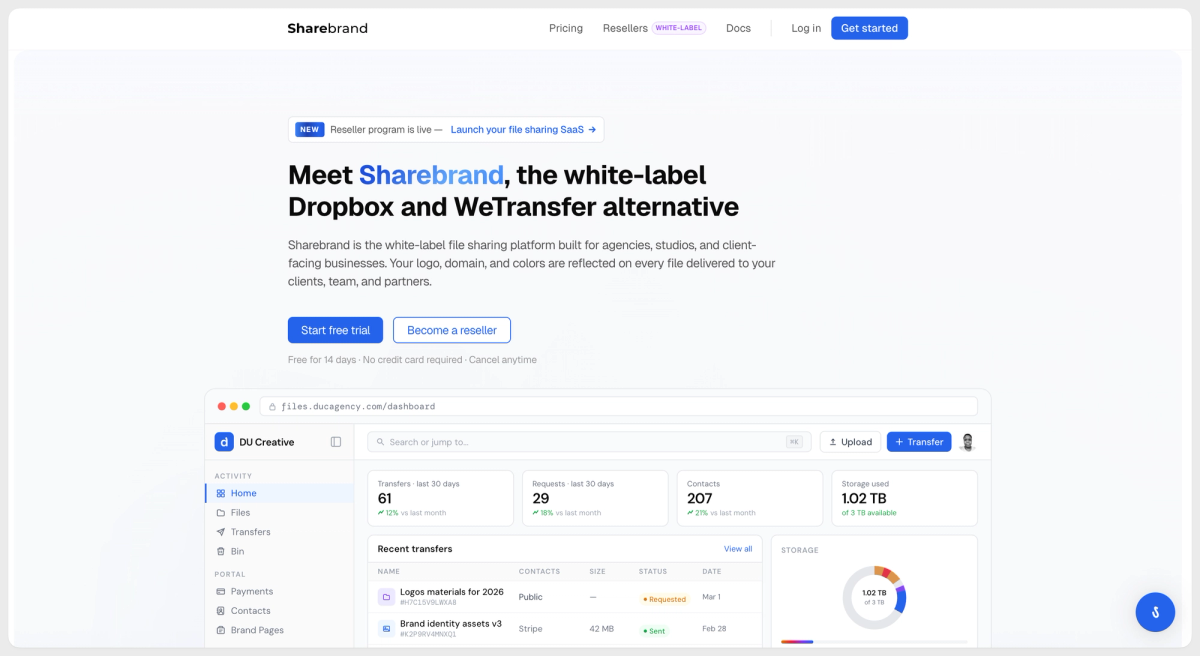
Sharebrand is a white-label file sharing platform built for client-facing businesses. It is not a desktop sync tool, not a backup product, and does not install anything on your machine. The comparison to Dropbox is partial, not complete, because they solve different problems.
When you send a file through Sharebrand, the link resolves at your domain. The page carries your logo and your name. The email arrives from your address. Recipients do not need to create an account to download. If they do create one, that account lives inside your branded workspace as your contact. Sharebrand is not visible to them at any point.
Pricing is flat: $29 per month for the Starter plan with 3TB and 5 team seats, $59 per month for Pro with 6TB and 10 team seats. Annual billing saves two months. Cancellation works. Deleted files stay recoverable for 90 days before permanent removal and count against your quota until fully deleted. That is stated upfront at sharebrand.io, not buried in fine print.
Sharebrand does not offer a desktop sync application and does not pretend to. If your primary need is syncing a local folder across machines in the background, that is a different category of product. What Sharebrand does is let you deliver files to clients professionally, under your own brand, without the platform inserting itself between you and the relationship.
Review citations drawn from public Trustpilot reviews. Names and countries match the published reviewer profiles.